
Leave Your Vacation Rental Management to the Experts
Free Online ConsultationWhen running a vacation rental in a standalone house, one of the biggest factors shaping the guest experience is the Wi-Fi environment.
Houses with multiple floors or large footprints often suffer from uneven Wi-Fi coverage throughout the property. This is especially common in properties with basements, upper floors, or detached rooms—the farther a room is from the router, the weaker the signal tends to be.
In today’s market, where guests range from leisure travelers to business travelers and workation users, expectations around Wi-Fi quality are extremely high. If connection speed or stability falls short, guests will feel frustrated, and this frustration often shows up directly in review scores. To prevent this, it’s essential to use Wi-Fi extenders to ensure comfortable internet access throughout the entire home.
This article takes a detailed look at the Wi-Fi challenges commonly faced when running a vacation rental in a standalone house, along with the benefits of installing a Wi-Fi extender as a solution. If you want to build a more stable connectivity environment, be sure to read on. Take the necessary steps now to avoid low guest ratings caused by poor Wi-Fi.
1. Common Wi-Fi Problems in Standalone-House Vacation Rentals
1-1. Property Layout and Signal Reach Challenges
Compared to apartments or condos, standalone houses often have more vertical and horizontal space, meaning walls, floors, and staircases can all block or weaken the signal. Wi-Fi connectivity problems tend to arise in situations like the following:
- Multiple floors (two-story, three-story, etc.)
- Basements or attic rooms
- Japanese-style rooms with thick walls or sliding paper doors (shoji)
- Detached buildings or garages separate from the main house
For example, if the main router sits in a first-floor living room, rooms at the back of the second floor or in the basement often experience weak signals—leading to buffering videos or unstable video calls.
1-2. Load Increases as Guest Numbers Grow
Standalone-house rentals are often used by families or groups, meaning multiple guests may be streaming video or joining online meetings at the same time, putting a heavy load on the network. If part of the property has weak signal coverage, it can affect not just the people in that area, but the overall network performance as well.
This is especially true when many guests are using smartphones or tablets at once—those staying in rooms farther from the router face a higher risk of signal loss and unsatisfactory speeds.
1-3. Major Impact on Review Ratings
Slow or unreliable Wi-Fi is one of the most frequently cited complaints in vacation rental reviews. Many overseas guests will say things like, “I can tolerate an older building that’s a little less polished, but unstable internet is a dealbreaker.” Leaving this issue unaddressed can significantly lower your review scores and hurt future bookings.
On the flip side, offering fast, stable Wi-Fi can meet remote-work demand, boost guest satisfaction, and encourage longer stays and repeat bookings.
2. The Role of Wi-Fi Extenders
2-1. Extending and Amplifying the Router’s Signal
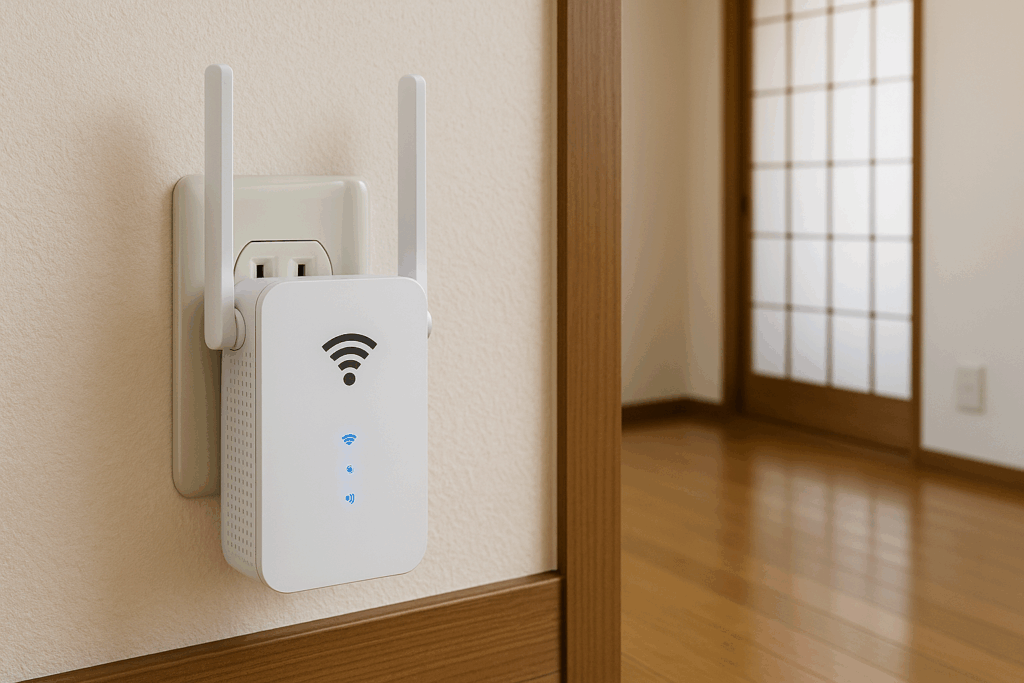
A Wi-Fi extender is a device that receives the signal from your main router and rebroadcasts it, effectively expanding your coverage area. By connecting the main router and the extender via Wi-Fi or a wired LAN connection, the extender relays the signal further, allowing strong connectivity to reach rooms that are far from the router or separated by floors.
- By establishing a router → extender → device communication path, you can compensate for signal loss caused by distance or obstacles
- The concept of mesh Wi-Fi has also become more widespread, with products now available that link multiple extenders together to provide seamless coverage across the entire home
2-2. Benefits of Installing an Extender
- Eliminates dead zones: Establishes stable connectivity even in areas that previously had poor Wi-Fi reception, such as second-floor bedrooms or detached rooms
- Relatively easy to maintain once installed: With proper initial setup and wiring, it generally requires little to no ongoing attention
- Cost-effective coverage expansion: Often cheaper than upgrading to a high-performance router or running new wired LAN cabling
2-3. Points to Consider When Choosing an Extender
- Wi-Fi standard (Wi-Fi 5/6, etc.): Since guests will likely be using the latest devices, a Wi-Fi 6-compatible extender is ideal
- Supported frequency bands (2.4GHz/5GHz): The 5GHz band is faster but weaker against obstacles, while 2.4GHz covers a wider area more easily. Dual-band support is recommended
- Mesh Wi-Fi vs. standalone extender: For a large standalone house, mesh Wi-Fi is worth considering; for a more compact property, a single extender may be sufficient
3. Five Benefits of Installing a Wi-Fi Extender
3-1. Improved Guest Satisfaction and Review Scores
Guests being able to enjoy a stable Wi-Fi connection no matter which room they’re in is a point that tends to earn high marks in reviews. International guests and business travelers, in particular, are sensitive to internet quality, and a negative impression of “unstable Wi-Fi” can drag down your ratings. Conversely, a smooth experience will leave guests with a positive impression, such as “the internet was great, which really helped.”
3-2. Comprehensive Coverage Across Multiple Floors and Detached Rooms
Common issues in standalone houses—like weak signal in second-floor or detached rooms, or poor Wi-Fi reception near the entrance or garage—can be resolved with comprehensive coverage from a Wi-Fi extender. Guests won’t need to manually switch connections as they move between rooms, and a seamless network setup earns praise for letting them “use the internet without ever thinking about it.”
3-3. Ready for Business Use and Workations
In recent years, more guests have been choosing standalone-house rentals for workations and remote work. A guest might join an online meeting in an air-conditioned room, then relax in the living room watching videos in the evening. An environment where the internet works reliably everywhere is a huge help for guests balancing work and leisure, and serves as a differentiating factor as “a property you can confidently use for business.”
3-4. Smoother Simultaneous Connections Among Guests
When large groups—families or friends—stay together, multiple devices (smartphones, tablets, laptops, etc.) will be connecting to Wi-Fi at the same time. If one room has a weak signal from the main router, guests there may complain, “my room barely gets a connection.” With multiple extenders installed, the signal load is distributed, making it much more likely that everyone can stream video or make calls simultaneously without frustration.
3-5. Encourages Repeat Bookings from Long-Stay Guests and Families
A comfortable internet environment increases the likelihood that long-stay guests will book your property again. For families staying during summer vacation or other extended breaks, being able to reliably support kids’ online learning or parents’ remote work is a major draw. This, in turn, directly contributes to higher occupancy rates and revenue.
4. Points to Watch Out for When Installing an Extender
4-1. Choosing the Right Installation Spot
As a general rule, extenders should be placed roughly midway between the main router and the area you want to cover. If it’s too far from the router, the extender itself will only receive a weak signal, resulting in a weak extended signal as well. On the other hand, placing it too close to the router won’t expand coverage enough.
- Measure signal strength: Use a smartphone app or dedicated tool to find a location that balances reasonably strong signal reception with proximity to the area you want to extend coverage to
- Location of power outlets: Since extenders need to be plugged in at all times, check where wall outlets are located and make sure they’re not blocked by furniture or appliances
4-2. Channel Settings and Interference Countermeasures
In densely populated areas or apartment districts with many nearby Wi-Fi routers, the 2.4GHz band can become congested, causing slowdowns and connection instability. When installing an extender, it can help to optimize the channel settings on both the router and extender, and to prioritize the 5GHz band where possible—this can reduce interference and improve speeds.
4-3. Guest Passwords and Security
In vacation rental operations, since a wide, unspecified range of guests will be using your Wi-Fi, security measures are essential. It’s a good idea to separate networks for guests and hosts on your router and extender (a guest SSID and a management SSID). It’s also wise to change passwords regularly when guests are using the network, to reduce the risk of unauthorized access.
5. Installation Process and Operational Tips
5-1. Preparation Before Installation
- Understand the property layout: Measure which rooms have weak signal and identify the areas that need improvement
- Check main router performance: If the router is too old or your plan has low speeds, you may need to upgrade the router itself before installing an extender
- Select an extender: Compare price, supported standards (Wi-Fi 5 or Wi-Fi 6), and mesh compatibility, then choose a product suited to the size and layout of your property
5-2. Actual Setup and Configuration
- Survey signal strength: Use your smartphone’s Wi-Fi signal indicator or a Wi-Fi analyzer app to find a spot where the main router’s signal is still reasonably strong
- Plug in the extender: Plug the extender into a wall outlet at the chosen location and begin connecting
- Complete setup: Connect to the router using the WPS button or a web browser, then configure the SSID and password
- Run a connectivity test: After installation, run a speed test in the previously problematic area to confirm the improvement
5-3. Ongoing Maintenance
Simply updating firmware and occasionally restarting your Wi-Fi router and extender can lead to significant improvements in connection quality. By checking and updating them regularly, and addressing any issues promptly, you can minimize guest frustration.
Conclusion: Achieve Stable Wi-Fi in Your Standalone-House Rental with an Extender
When running a vacation rental in a standalone house, it’s common for areas the main router simply can’t reach to develop, causing inconvenience for guests. Installing a Wi-Fi extender is a great solution—it extends coverage to multiple floors and detached rooms, creating a stress-free connectivity environment throughout the entire property.
Guests use the internet for all kinds of purposes—looking up sightseeing information, posting on social media, working remotely, making video calls—so poor connection quality alone can lead to a negative review saying “I won’t stay here again.” On the other hand, properties that offer stable, high-speed connectivity tend to see strong demand from both business and leisure travelers, which readily translates into higher booking rates and nightly rates.
Setting things up involves a few detailed steps—choosing the right installation location, coordinating with the main router, and addressing security considerations—but once the environment is properly configured, ongoing maintenance is relatively simple. In particular, adopting mesh Wi-Fi allows the router and extenders to work together as a unified network that covers the entire house.
When guests can confidently use the internet in any room, it translates into major gains in review scores and repeat bookings. If you’re just starting a standalone-house rental, or already operating one but struggling with Wi-Fi issues, we highly recommend seriously considering the installation of a Wi-Fi extender.
For Vacation Rental Setup Including Wi-Fi Installation, Trust Stay Buddy Co., Ltd.
If you’re looking for comprehensive support with building your vacation rental’s Wi-Fi environment, standalone-house operational know-how, cleaning management, and more, please don’t hesitate to contact Stay Buddy Co., Ltd.
Drawing on our extensive track record, we provide comprehensive consulting on everything from choosing the right router and extender and designing your network, to staff training and strategies for boosting guest satisfaction. By delivering seamless Wi-Fi and a comfortable stay, you can build a rental business that earns repeat guests and glowing reviews. Stay Buddy Co., Ltd. is here to support you—please feel free to reach out anytime.