Leave Your Minpaku Management to Us
Free Online ConsultationGuest Satisfaction in Minpaku Comes Down to Wi-Fi Speed | Reaching Every Corner of the Room
In Osaka’s short-term rental market, what’s the first thing a guest does after entering a room? They might set down their bags, or dive straight onto the bed. But almost without fail, the very next thing they do is “connect to Wi-Fi.”
Let’s start with the conclusion of this article.
In modern minpaku operations, Wi-Fi is the “fourth infrastructure,” standing alongside electricity, water, and gas. Complaints about slow connection speeds or dead zones in the corners of a room can instantly undo the appeal of a great location or beautiful interior—becoming the single biggest cause of devastating 1- or 2-star reviews.
For inbound guests especially, Wi-Fi is a lifeline. Posting to social media, streaming videos, video-calling family, and searching for the next leg of their trip—creating an environment where all of this can happen without friction is no longer a bonus service. It’s a basic obligation.
In this article, we’ll walk you through how to build a Wi-Fi setup that pushes guest satisfaction to 100%, along with essential techniques for ensuring the signal reaches every corner of the room—especially critical for whole-building rentals and larger properties.
Why “Wi-Fi Complaints” Are More Fatal Than Other Issues
Review categories on platforms like Airbnb include things like “cleanliness,” “accuracy,” and “communication”—but Wi-Fi trouble has the power to drag down every single one of these ratings.
The “Biggest Stress” That Steals a Guest’s Time
Imagine returning from sightseeing, settling in to relax and watch a video, only for the screen to freeze. Or trying to send a work email, only to get disconnected. These moments turn a guest’s precious time into a “battle with Wi-Fi.” This kind of stress runs deep and lingers as the memory of “the worst stay ever”—no matter how excellent everything else was.
Irreversible Damage to Reviews
The moment a review includes the phrase “Wi-Fi is terrible,” booking rates plummet in the aftermath. This is especially true for workation guests and long-term stayers combining travel with remote work, who scan reviews for the word “Wi-Fi” before anything else. Once a property earns the label of “the place with weak internet,” shaking it off is extremely difficult.
What Connection Speed Counts as a “Passing Grade” for Guests?
When it comes to Wi-Fi in minpaku properties, simply “being connected” isn’t enough. As a professional host, it’s important to know the concrete benchmarks to aim for.
The Minimum Standard: 30–50 Mbps Download Speed or Higher
To smoothly stream 4K YouTube videos or allow multiple people to join a Zoom call at the same time, you’ll want a stable download speed of at least 30 Mbps. If you’ve installed a fiber-optic connection and can exceed 100 Mbps, you’re likely to earn praise like “Fast Wi-Fi!” in guest reviews.
Upload Speed Matters Too
For guests uploading videos to social media or backing up photos to the cloud, upload speed is just as important. Mobile Wi-Fi (pocket Wi-Fi) devices often have extremely slow upload speeds, which is why installing a fixed fiber-optic line is essentially a must.
Eliminating “Dead Zones” — The Hidden Pitfall of Large Properties and Whole-Building Rentals
A single router might be enough for a studio apartment, but in Osaka’s popular whole-building rentals or spacious 3LDK-and-up properties, there will always be “rooms the signal can’t reach.”
1. Mesh Wi-Fi Is the Right Answer
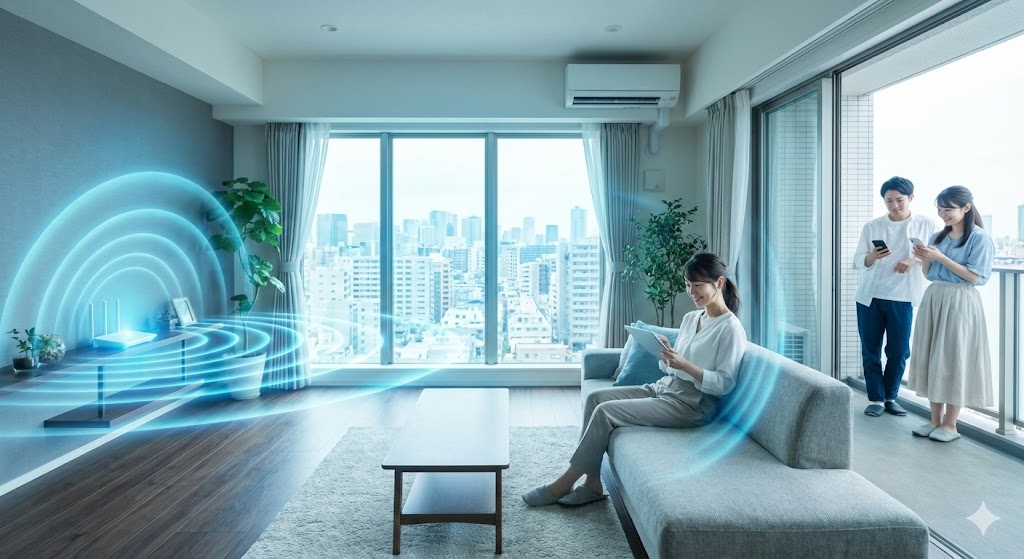
Traditional “signal extenders” were a hassle to set up and lost speed the farther you got from the main router. With modern **”mesh Wi-Fi,”** multiple units form a networked mesh across the property, so guests get the same speed and the same network name (SSID) no matter where they are in the house. For a three-story house, the ideal setup is one unit per floor.
2. Move the Router’s Placement to a “Higher” and “More Central” Spot
Is your router hidden inside a closet, or sitting on the floor in the corner of a room?
Since signals weaken when blocked by obstacles, the basic rule is to place the router as close to the property’s “center” as possible, at a height of 1–1.5 meters off the floor, free from obstructions. Also avoid placing it near microwaves or cordless phones, which can easily cause interference.
3. Display the SSID and Password in a “Prominent Location”
Half of all Wi-Fi connection problems come down to guests either “mistyping the password” or “not knowing where the router is.”
- At the entrance
- On the living room table
- On the desk in each room—display the password clearly in these spots, and consider adding a QR code so guests can connect just by scanning it with their camera.
Making “Speed Tests” a Routine Part of Cleaning Staff Duties
Wi-Fi problems are usually discovered only after a guest has already checked in. Preventing this before it happens is a mark of professional management.
Build a **”Wi-Fi speed test”** into the post-cleaning checklist.
All it takes is measuring the speed in the living room and each bedroom using a free smartphone app. If the speed is lacking, simply restarting the router often solves the problem. Building a system where cleaning staff verify the “on-site infrastructure” before a guest ever notices an issue is the secret to maintaining high ratings.
Conclusion: Wi-Fi Is Part of the Infrastructure of Hospitality
No matter how luxurious the furniture, installing a single high-performance router with mesh Wi-Fi will reliably boost guest satisfaction more.
- Install a stable “fiber-optic connection” rather than relying on mobile Wi-Fi.
- For larger properties, eliminate dead zones entirely with “mesh Wi-Fi.”
- Always run a “speed test” during cleaning to confirm everything is working properly.
Elevating Wi-Fi from “it’s supposed to work” to “blazing fast everywhere” is exactly the kind of attention to detail that helps you stand out and keep getting chosen in Osaka’s fiercely competitive minpaku market.
Supporting Stress-Free Operations, from Internet Setup to Cleaning Management
“I’m struggling with complaints about slow Wi-Fi at my property.”
“I want a professional to rebuild the internet environment at my whole-building rental.”
“I want to entrust every detail of management—including Wi-Fi checks during cleaning—to the experts.”
Whatever your concern, we’d love to hear from you.
Stay Buddy Inc. is a team of professionals specializing in minpaku management and cleaning services throughout Osaka City.
We’re not just a “cleaning company.”
- Design and implementation support for the optimal Wi-Fi setup based on your property’s size
- A rigorous quality management process with standardized connection-speed checks during cleaning
- Fast remote and on-site support whenever internet issues arise
These strengths allow us to polish your property into a “5-star property” where guests can stay without any stress.
From invisible infrastructure to visible cleanliness—as your partner in successful minpaku operations in Osaka, please feel free to reach out to us anytime.